
The entire interaction with the charging station is divided into four steps for clarity:

Step 1: Before the charging process
Initially, customers can receive an RFID card from the respective charging station operators, which is used for authentication at the charging station. Customers must be informed of the tariffs and conditions by the charging station operators.
Step 2: During the charging process
2.1 To start a charging process, a free and operational charging station must be selected. The charging readiness of the charging station can be viewed via the status LEDs. Half of the status LEDs on the type 2 charging connection side flash blue, while all status LEDs on the opposite side light up blue continuously.
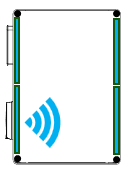
 DANGER: Risk of death, serious injury and burns Before each use, check the charging cable and contacts for damage, moisture and dirt. Never charge with a damaged, dirty or damp charging cable or such a vehicle charging socket. If the plug connection smokes or melts, never touch the charging cable.
If possible, stop the charging process.
2.2 Now connect your vehicle to the charging station using your charging cable by lifting up the cover of the type 2 charging connection. The energy meter values are shown on the display (see chapter 5.1).
 ATTENTION: Before charging, be sure to check for error codes that may be shown on the display. If an error code (e.g. Err 0005) is displayed, charging must not be started with the charging station. In this case, notify the respective charging station operator.
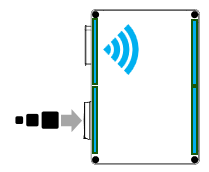
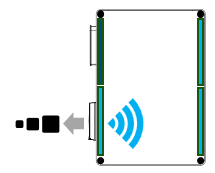
2.3 As soon as the charging cable is connected to the vehicle and the charging station, the upper half of the charging station flashes at the height of the RFID reader. Now hold the RFID card you received in step 1 to the RFID reader, which is located above the Type 2 charging port.
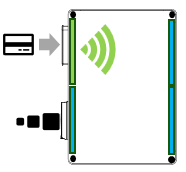
If the card is activated by the charging station operators, the status LED on the RFID reader briefly lights up green and the charging process starts. Furthermore, the type 2 charging connection locks and the charging cable can no longer be pulled out of the charging station.
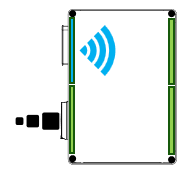
2.4 During the charging process, half of the status LED at the level of the RFID reader flashes blue. The remaining status LEDs light up green. During the charging process, the charging values can be viewed on the display of the charging station, as well as other values via the respective OEM app of your vehicle.
2.5 Ending the charging process:
To end the charging process, simply hold the RFID card that you used to start the charging process up to the RFID reader again. The status LED in the charging port area will now flash blue and the port will be unlocked. You can now unplug your charging cable from the charging station.
 DANGER: Risk of death, serious injury and burns
Never pull the vehicle charging plug with force. Dangerous arcs of light can lead to death or serious injury. Contact the respective operator of the charging station in the event of faults.
Step 3: CDR generation and billing
Once the charging process is complete, you can view the final energy charged in the unit [kW] and the charging period in hours [h] on the charging station display. The charging process data determined by the energy meter is signed and transmitted to the backend of the charging infrastructure operator. You will then receive a bill from the charging station operator in accordance with the relevant tariff conditions.
Step 4: Checking the charging process and the invoice
All information relevant to calibration law must be included in the charging process invoice, so that you can subsequently check and trace the invoice. In addition, you will receive an XML file with signature information from the charging station operator. You can check this for correctness using transparency software (see chapter 7).